Note: Although the CygNet Service Migration utility performs many device template file (.dtf) checks and automatic updates, it does not catch all possible template errors. After running the CygNet Service Migration Utility, always use the CygNet Device Template Manager Utility to check your templates. Errors uncovered by the CygNet Device Template Manager Utility must be repaired manually.
The CygNet Service Migration utility (SvcMigration.exe) is a database service transformation tool. It enables CygNet to make database service-wide updates on a version-by-version basis. Usually, the update options displayed by the CygNet Service Migration Utility are required; affected services will not operate correctly if the changes are not made. However, once you have made changes for a version on a given service, those changes do not need to be made again for that service. The list of available updates changes from CygNet version to version.
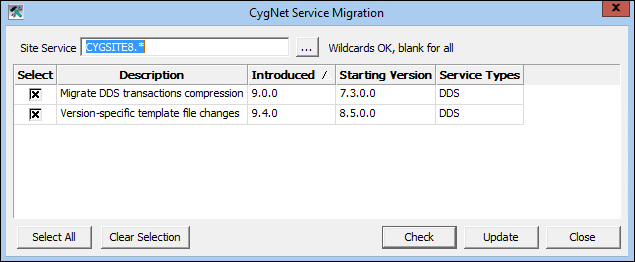
Click the following image to see a sample CygNet Service Migration utility dialog box:
For more information, see the following subsections below:
See the CygNet Upgrade Procedure for more information.
To Perform a Service Migration
The following table lists all of the update options displayed in the current version of the CygNet Service Migration Utility. The list of available updates changes from CygNet version to version. The columns are sortable, making it easier to determine which option was added for a particular version.
| Update Option | Description | Introduced | Starting Version |
|---|---|---|---|
|
Migrate DDS transactions compression |
Updates any records in the DDS database that are stored using a deprecated compression format. |
9.0.0 |
7.3.0.0 |
|
Version-specific template file changes |
Updates changes to template files to specify that canSend/canRecv/uccSend/uccRecv=true for the “Configurable Data Group” (CfgDg). |
9.4.0 |
8.5.0.0 |
The following table lists and describes CygNet Service Migration Utility properties.
| Property | Description |
|---|---|
|
Site Service |
Use the Browse button to select a single, specific Site.Service to check and update. You can also use wildcards (*) to select a subset of available database services on a specific domain to check and update. Or, finally, leave this field blank to check and update all database services on a specific domain. |
|
Select |
This column displays check boxes to indicate which service migration changes you want to accept. |
|
Description |
This column displays descriptions of the available service migration changes. |
|
Introduced |
This column indicates the CygNet version in which the service migration option was added. |
|
Starting Version |
This column displays the CygNet version to which a service migration change applies. For instance, if a version displayed is 8.5.0.0, best practice strongly recommends or requires that if you are using or plan to use v8.5.0.0 or later, select this option to update. Note: If you have accepted a specific service migration change in the past, you do not need to re-accept that change again. For instance, if you already converted service references, you do not need to perform that update again during an upgrade. |
|
Service Types |
This column displays the database service types affected by a service migration change. |
|
Select All |
Enables you to select all available service migration change options at once. |
|
Clear Selection |
Enables you to clear all selected service migration options at once. |
|
Check |
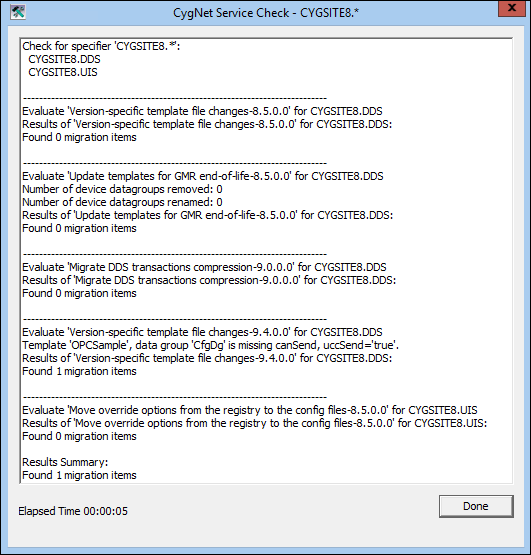
Enables you to perform a preliminary check of all affected services. A report generates in a CygNet Service Check dialog box with useful notes about what changes would occur if you were to update. Items displayed are those items for which there is a discrepancy and which will be corrected by the service migration when you click Update. |
|
Update |
If you are ready to perform a service migration on the items you checked in the CygNet Service Migration dialog box, click Update. This updates and corrects all migration items noted in the CygNet Service Check dialog box when you clicked Check. |
|
Close |
Click Close to close the CygNet Service Migration dialog box. |

|
|
|

